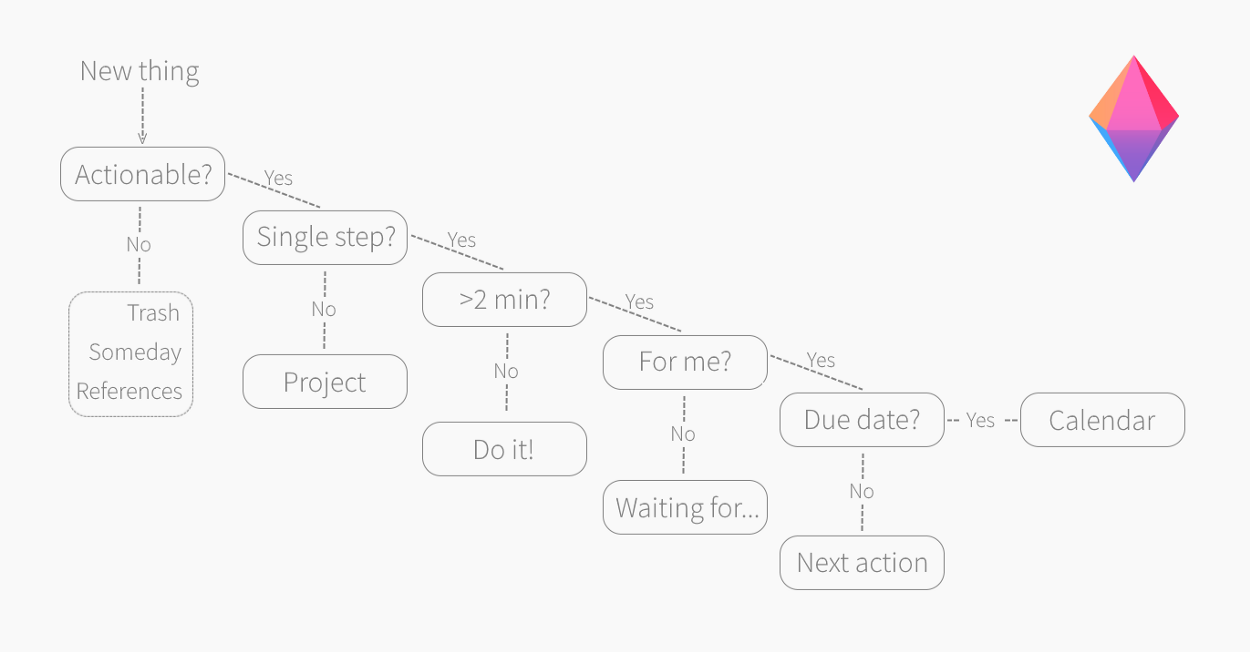
WHAT
Establish a 5-step GTD method, including the following steps:
- Collect tasks, projects, and ideas
- Process ideas to set up actions
- Organize tasks into measurable action plans
- Keep track and adjust
- Complete tasks
Fill in the GTD form with your team in class and turn in to Mr. Le Duc
WHY
- According to James Clear’s book Atomic Habits, breaking larger tasks into smaller, manageable tasks helps create momentum by making progress feel achievable and less overwhelming. This approach leverages the power of small wins to build consistent habits and sustained motivation.
- David Allen, in his book Getting Things Done, emphasizes the importance of having a trusted system to manage all tasks and commitments. By externalizing tasks into a reliable system, students can reduce mental clutter and focus more effectively on completing their work.
- Cognitive research supports that the human brain is optimized for focused attention on one task at a time. Multitasking divides attention and reduces efficiency, making it more difficult to perform tasks effectively or retain information (e.g., Rubinstein, Meyer, & Evans, 2001). Thus, focusing on smaller, discrete tasks sequentially improves productivity and learning outcomes.
HOW
- Pick tools like Google Keep, Google Tasks, Trello, Workflowy, paper-based notebook, or another system you can personalize
- Watch Mr. Le Duc’s Explain Google Tasks video tutorial
- Watch Using Google Keep in your Getting Things Done workflow (YouTube)
- Great 4:30 minute overview
- WatchGetting Things Done with Google Calendar, Keep, & Tasks (YouTube) – DETAILED HOW-TO
- Watch from 19:20 to end to get the overview
- Then watch the whole video
- Le Duc recommends using the Google tools for your GTD if you are just getting started
- Watch the other videos in the resources section of this page to get a better idea about the GTD process and potential tools you can use
- Create a new blog post with your Edublogs.org blog
- Copy and paste the My GTD Trusted System: NAME THE SYSTEM – TEMPLATE
- Follow the directions in the blog post
- Lastly, add or update the names(s) of your Trusted System Tools in the Project Tracking Sheet (PTS) under the GTD Trusted System column
RESOURCES
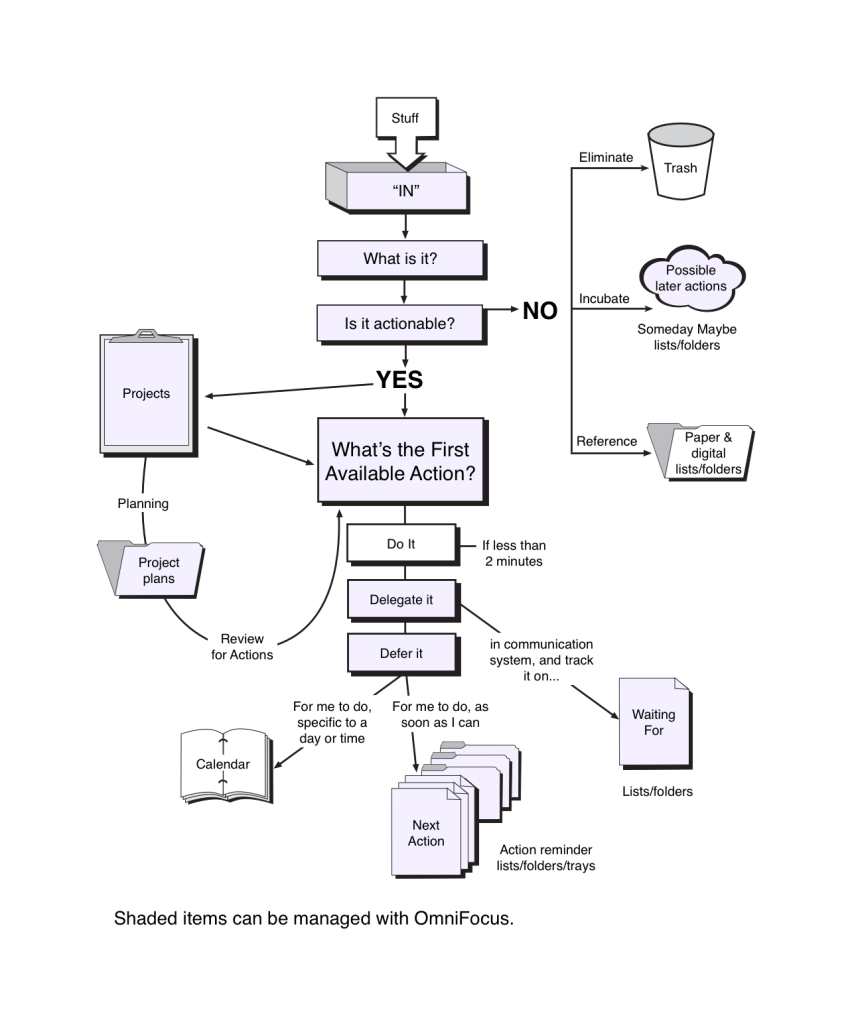
GTD Sample Flowchart
GTD Learning Resources
- Procrastination – 7 Steps to Cure (YouTube)
- GTD Workflow Image (Image)
- The Art of Stress-Free Productivity: David Allen (YouTube) – INTRODUCTION TO GTD THEORY
- Getting Things Done (GTD) by David Allen – Animated Book Summary And Review (YouTube) – GOOD GTD PROCESS OVERVIEW
- Avoid This BIG Beginner Mistake with GTD (YouTube) – STRATEGIES
- Le Duc’s GTD Bookmarks at Diigo.com
- Le Duc’s GTD YouTube Playlist
Some GTD Tool Learning Resources
- Google Keep Option for GTD with other Google Tools like Google Tasks, Google Calendar, and Gmail
- Getting Things Done with Google Calendar, Keep, & Tasks (YouTube) – DETAILED HOW-TO
- Watch from 19:20 to end to get the overview
- Using Google Keep in your Getting Things Done workflow (YouTube) – Simple Overview of GTD Basics and use of Google Keep for Capture Process
- Set up Google Keep for your GTD workflow (YouTube) – SIMPLE HOW-TO
- 5 Ways to Get More Out of Google Keep (App Tips & Tricks) (YouTube) – IDEAS
- Getting Things Done with Google Calendar, Keep, & Tasks (YouTube) – DETAILED HOW-TO
- Trello GTD Option
- How to Use TRELLO for Getting Things Done (GTD) (YouTube) – DETAILED HOW-TO
- trello.com/en/pricing
- Evernote GTD Option
- Using Evernote with Getting Things Done (YouTube) – DETAILED HOW TO
- evernote.com/compare-plans
- OmniFocus GTD Option
- OmniFocus + Getting Things Done (GTD) (YouTube) (Mac Only – $50-Standard or $100-Pro)
- Watch 0:00-3:00 and 5:00 to end
- store.omnigroup.com/omnifocus
- OmniFocus + Getting Things Done (GTD) (YouTube) (Mac Only – $50-Standard or $100-Pro)
- Workflowy Option
- Notion
- notion.so
- Notion is the connected workspace where better, faster work happens. Now with AI
Some More Tools
- Google Keep (Free with Google account) works with Google Tasks, Google Calendar, and Gmail
- Trello Board GTD Template (Free with Trello account) – Scott uses this tool
- Paper Notebook or Journal ($1 to $20)
- OmniFocus (Mac Only – $50-Standard or $100-Pro) – Scott uses this tool
- Read more about how OmniFocus works with the GTD processinside.omnifocus.com/gtd-whitepaper
- Evernote (Free to start with upgrade purchase options)
- notion.so (Free to start with upgrade options)
Le Duc’s 2020 Remote Learning GTD Project Samples
- All Classes GTD Part 1 – Week 9
- Film Class GTD Part 2 – Week 10
- Film Class Updating Workflow – Week 11
- School of Rock Updating Workflow – Week 11
- Game Design Updating Workflow – Week 11
RUBRIC
4 Points – Exemplary
- All five GTD steps (Collect, Process, Organize, Keep Track & Adjust, Complete) are clearly explained and demonstrated in the system described.
- The blog post names the specific tool(s) used (e.g., Google Keep, Trello, WorkFlowy) and provides detailed, clear explanations of how each tool supports the GTD workflow, which also includes A SCREENSHOT of your trusted system TOOL
- The rationale connects explicitly to James Clear’s Atomic Habits concept of breaking larger tasks into smaller ones and David Allen’s emphasis on having a trusted system to reduce mental clutter.
- The blog post includes a clear reference to research about the brain’s ability to focus on one task at a time and the inefficiency of multitasking (e.g., Rubinstein, Meyer, & Evans, 2001).
3 Points – Proficient
- Most of the five GTD steps are addressed with some explanation on how they apply to the chosen trusted system.
- The blog post names the tool(s) and provides a general description of their use within the GTD method.
- The rationale mentions either James Clear’s or David Allen’s ideas, but does not fully integrate both.
- There is some reference to cognitive research on multitasking, though it may be brief or general.
2 Points – Developing
- Only some GTD steps are mentioned, with limited or unclear explanations about how they fit in the system.
- The blog post names one or more tools but lacks sufficient detail on how they support GTD.
- The rationale is incomplete or only loosely connected to the GTD method or habit-building concepts.
- No clear citation or explanation about the brain’s focus limitations and multitasking.
1 Point – Beginning
- The blog post misses most or all GTD steps or explains them inaccurately.
- Tools are not named or described, or the description is very vague.
- The rationale does not mention James Clear, David Allen, or relevant research.
- The blog post lacks clarity and detail about the system or its benefits.
FEEDBACK ON THIS LESSON
- Write questions or comments about this lesson at our Dotstorming Board
 Capital High School


You must be logged in to post a comment.